Two-Step Monthly Closing with Approval Process
Overview
TimePunch offers an automated, two-step monthly closing with an integrated approval process for work and project times.
Employees are notified in a timely manner about the upcoming monthly closing and can review their recorded times and correct them if necessary. They can then initiate the approval process on their own.
Once all required approvals have been granted by the relevant supervisors and project managers, the monthly closing is performed automatically. The closed times are locked to prevent further editing by employees.
In this way, TimePunch ensures a structured and traceable monthly closing while reducing administrative overhead.
Monthly Closing Settings
The settings for the two-step monthly closing with approval process determine which times must be approved and when TimePunch automatically initiates or completes the monthly closing.
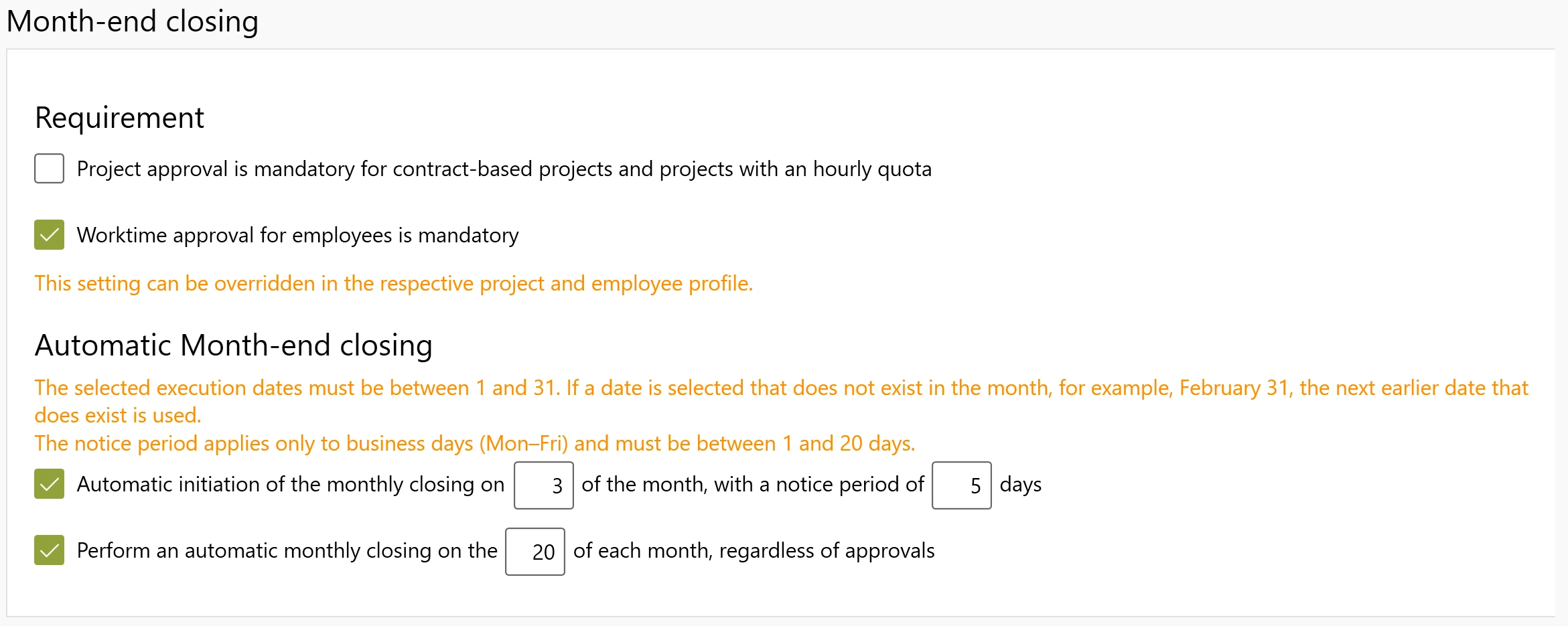
Prerequisites
Two requirements can be enabled for the approval process:
- Project Approval is mandatory for order-based projects and projects with hourly quotas: Specifies that approval is required for the corresponding projects.
- Approval of working hours is mandatory for employees: Specifies that employees’ working hours must be approved.
Both requirements can be overridden individually in the respective project or employee profile.
Automatic Monthly Closing
Two independently configurable functions are available for automatic execution.
Automatic Initiation of Monthly Closing
With this option, TimePunch creates the monthly closing for the previous month on the specified calendar day of the following month and initiates the approval process.
The advance notice period determines how many business days in advance employees are notified via email of the upcoming monthly closing. They can use this time to review their entries and correct them if necessary.
Automatic Monthly Closing Independent of Approvals
This option sets a latest closing date. As soon as all required approvals are in place, the month in question is automatically closed before this date.
If approvals are still pending on the set cutoff date, TimePunch closes the months that have not yet been fully approved by that point regardless of the approval status. The closed time entries are then locked for employees.
Notes on the dates:
- The execution dates must be between 1 and 31.
- If the selected calendar day does not exist in the relevant month, TimePunch uses the last available calendar day (for example, February 28 instead of February 31 in a non-leap year).
- The advance notice period is 1 to 20 business days. Monday through Friday count as business days.
Example: Monthly Closing for October
If the process is initiated automatically on the 3rd of the month, with a notice period of 5 business days and a latest closing date of the 20th of the month, the following sequence occurs:
- Notice: Five business days before November 3, employees are reminded via email to review their time entries for October.
- November 3: TimePunch automatically initiates the monthly closing and the associated approval process for October.
- After full approval: As soon as all required work and project time approvals are in place, October is automatically closed—possibly even before November 20.
- November 20: Months that have not yet been fully approved will be closed regardless of any pending approvals.
November 20 is therefore the latest closing date. Fully approved months will not be kept open unnecessarily until this date.
Initiate Monthly Closing
Employees can initiate the monthly closing on their own via online data entry or self-reporting.
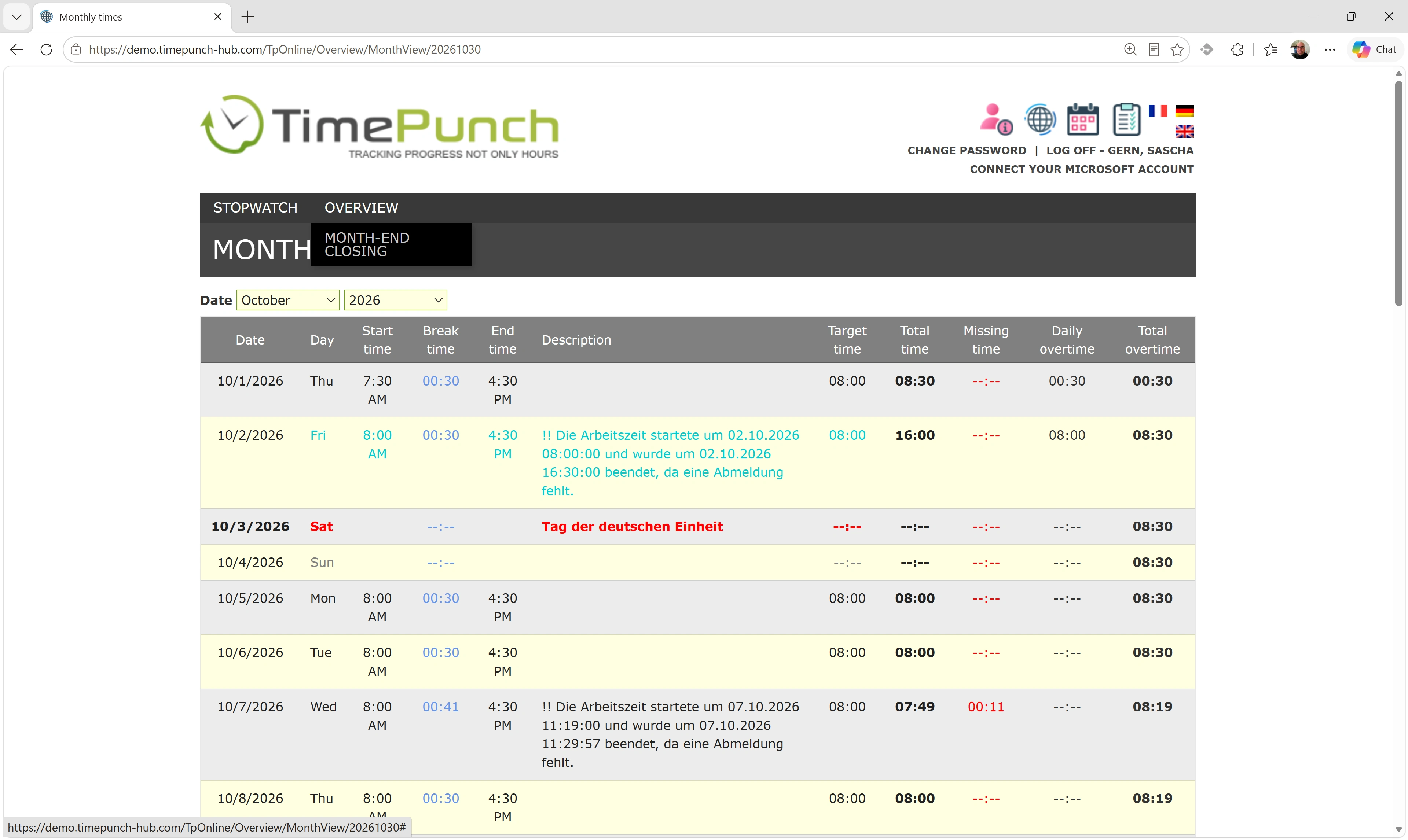
To do this, select the “Monthly Closing” menu item in the “Monthly Overview”. A confirmation prompt will then appear:
Do you really want to perform the monthly closing?
After confirmation, the approval process for the recorded work and project times begins.
- Pending Approvals: If there are still times awaiting approval, the responsible project managers and team leaders will be notified via email the following night about the pending approvals.
- No Pending Approvals: If no approvals are required, the monthly closing is performed immediately.
Monthly Closing Period
By default, the monthly closing is performed for the previous month.
Exception: If employees have already been notified of the upcoming monthly closing within the configured advance notice period, they can also close the current month early, provided that all work and project times for that month have been fully recorded.
The advance notice period is set in the monthly closing settings in business days (Monday through Friday).
Approval of Work and Project Times
After the monthly closing is initiated, the responsible team and project managers are notified of any pending approvals. The notification is sent automatically via email during nightly processing and is repeated daily as long as approvals are pending.
Times are reviewed and approved using the existing approval processes in TimePunch.
For more information on this, see the following sections:
As soon as all required approvals have been received, the monthly closing is performed automatically.